CyberStrikeAI
π AI-Powered Autonomous Penetration Testing Platform - Built with Golang, featuring hundreds of built-in security tools, flexible custom tool extensions, and intelligent AI decision-making through MCP protocol, making security testing as simple as a conversation.
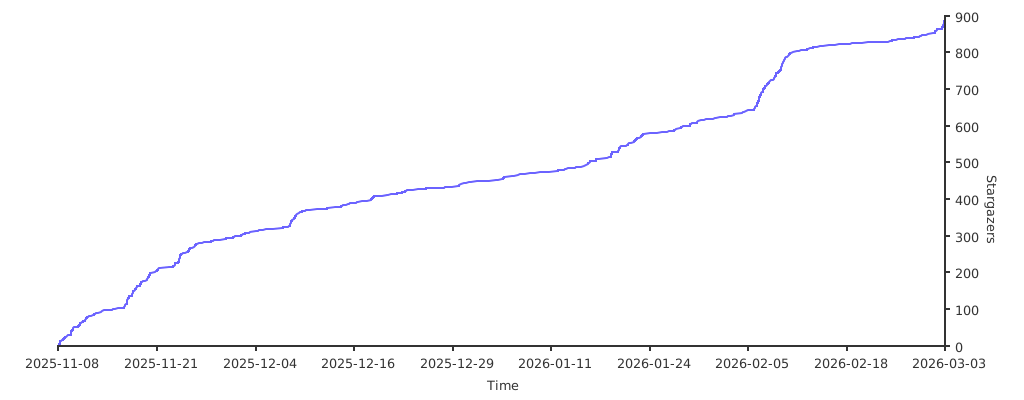
GitHub Stars
110
User Rating
Not Rated
Favorites
0
Views
13
Forks
21
Issues
0
CyberStrikeAI
π AI-Powered Autonomous Penetration Testing Platform - Built with Golang, featuring hundreds of built-in security tools, flexible custom tool extensions, and intelligent AI decision-making through MCP protocol, making security testing as simple as a conversation.
Web Mode
MCP Stdio Mode
External MCP Server Integration (supports stdio and HTTP transport modes)
Attack Chain Visualization

Changelog
- 2025.11.17 Added attack chain visualization feature: automatically build attack chains from conversations using AI analysis, visualize tool execution flows, vulnerability discovery paths, and relationships between nodes, support interactive graph exploration with risk scoring
- 2025.11.15 Added large result pagination feature: when tool execution results exceed the threshold (default 200KB), automatically save to file and return execution ID, support paginated queries, keyword search, conditional filtering, and regex matching through query_execution_result tool, effectively solving the problem of overly long single responses and improving large file processing capabilities
- 2025.11.15 Added external MCP integration feature: support for integrating external MCP servers to extend tool capabilities, supports both stdio and HTTP transport modes, tool-level enable/disable control, complete configuration guide and management APIs
- 2025.11.14 Performance optimizations: optimized tool lookup from O(n) to O(1) using index map, added automatic cleanup mechanism for execution records to prevent memory leaks, and added pagination support for database queries
- 2025.11.13 Added authentication for the web mode, including automatic password generation and in-app password change
- 2025.11.13 Added
Settingsfeature in the frontend - 2025.11.13 Added MCP Stdio mode support, now seamlessly integrated and usable in code editors, CLI, and automation scripts
- 2025.11.12 Added task stop functionality, optimized frontend
β¨ Features
Core Features
- π€ AI Intelligent Agent - Integrated OpenAI-compatible API (supports GPT, Claude, DeepSeek, etc.), AI autonomously makes decisions and executes security tests
- π§ Intelligent Decision Engine - AI analyzes targets and automatically selects optimal testing strategies and tool combinations
- β‘ Autonomous Execution - AI agent automatically invokes security tools without human intervention
- π Adaptive Adjustment - AI automatically adjusts testing strategies based on tool execution results and discovered vulnerabilities
- π Intelligent Summary - When maximum iterations are reached, AI automatically summarizes test results and provides next-step execution plans
- π¬ Conversational Interface - Natural language conversation interface with streaming output (SSE), real-time execution viewing
- π Conversation History Management - Complete conversation history records, supports viewing, deletion, and management
- βοΈ Visual Configuration Management - Web interface for system settings, supports real-time loading and saving configurations with required field validation
- π Large Result Pagination - When tool execution results exceed the threshold, automatically save to file, support paginated queries, keyword search, conditional filtering, and regex matching, effectively solving the problem of overly long single responses, with examples for various tools (head, tail, grep, sed, etc.) for segmented reading
- π Attack Chain Visualization - Automatically build and visualize attack chains from conversations, showing tool execution flows, vulnerability discovery paths, and relationships between targets, tools, vulnerabilities, and discoveries, with AI-powered analysis and interactive graph exploration
Tool Integration
- π MCP Protocol Support - Complete MCP protocol implementation, supports tool registration, invocation, and monitoring
- π‘ Dual Transport Modes - Supports both HTTP and stdio transport methods, seamlessly usable in web applications and IDEs
- π οΈ Flexible Tool Configuration - Supports loading tool configurations from directories (YAML), easy to extend and maintain
- π Real-time Monitoring - Monitors execution status, results, call counts, and statistics of all tools
- π Automatic Vulnerability Analysis - Automatically analyzes tool output, extracts and categorizes discovered vulnerabilities
Technical Features
- π Streaming Output - Supports Server-Sent Events (SSE) for real-time streaming output, enhancing user experience
- πΎ Data Persistence - SQLite database stores conversation history and process details
- π Detailed Logging - Structured logging for easy debugging and troubleshooting
- π Secure Execution - Tool execution isolation, error handling, and timeout control
- π Password-Protected Web Interface - Unified authentication middleware secures every API call with configurable session duration
π Project Structure
CyberStrikeAI/
βββ cmd/
β βββ server/
β β βββ main.go # Program entry point, starts HTTP server
β βββ mcp-stdio/
β β βββ main.go # MCP stdio mode entry (for Cursor and other IDE integration)
β βββ test-config/
β βββ main.go # Configuration testing tool
βββ internal/
β βββ agent/ # AI agent module
β β βββ agent.go # Agent Loop implementation, handles AI conversations and tool calls
β βββ app/ # Application initialization
β β βββ app.go # Main application logic, route setup
β βββ config/ # Configuration management
β β βββ config.go # Configuration loading and tool configuration management
β βββ database/ # Database module
β β βββ database.go # Database connection and table structure
β β βββ conversation.go # Conversation and message data access
β βββ handler/ # HTTP handlers
β β βββ agent.go # Agent Loop API handling
β β βββ conversation.go # Conversation history API handling
β β βββ monitor.go # Monitoring API handling
β βββ logger/ # Logging system
β β βββ logger.go # Structured logging wrapper
β βββ mcp/ # MCP protocol implementation
β β βββ server.go # MCP server core logic
β β βββ types.go # MCP protocol type definitions
β βββ security/ # Security tool executor
β βββ executor.go # Tool execution and parameter building
βββ tools/ # Tool configuration directory
β βββ nmap.yaml # nmap tool configuration
β βββ sqlmap.yaml # sqlmap tool configuration
β βββ nikto.yaml # nikto tool configuration
β βββ dirb.yaml # dirb tool configuration
β βββ exec.yaml # System command execution tool configuration
β βββ README.md # Tool configuration documentation
βββ web/ # Web frontend
β βββ static/ # Static resources
β β βββ css/
β β β βββ style.css # Stylesheet
β β βββ js/
β β βββ app.js # Frontend JavaScript logic
β βββ templates/ # HTML templates
β βββ index.html # Main page template
βββ data/ # Data directory (auto-created)
β βββ conversations.db # SQLite database file
βββ config.yaml # Main configuration file
βββ go.mod # Go module dependencies
βββ go.sum # Go dependency checksums
βββ run.sh # Startup script
βββ README.md # Project documentation
Quick Start
Prerequisites
- Go 1.21 or higher
- OpenAI API Key (or other OpenAI-compatible API, such as DeepSeek, Claude, etc.)
- Security tools (optional): Install corresponding security tools based on your needs, the system supports hundreds of tools
Installation Steps
- Clone the repository
git clone https://github.com/Ed1s0nZ/CyberStrikeAI.git
cd CyberStrikeAI-main
- Install dependencies
go mod download
- Configuration
Method 1: Configure via Web Interface (Recommended)
After starting the server, click the "Settings" button in the top-right corner of the web interface to configure:
- OpenAI Configuration: API Key, Base URL, Model (required fields marked with *)
- MCP Tool Configuration: Enable/disable tools
- Agent Configuration: Maximum iterations, etc.
Configuration is automatically saved to the config.yaml file. Opening settings automatically loads values from the current configuration file.
Method 2: Edit Configuration File Directly
Edit the config.yaml file and set your API configuration:
# OpenAI-compatible API configuration (supports OpenAI, DeepSeek, Claude, etc.)
openai:
api_key: "sk-your-api-key-here" # Replace with your API Key
base_url: "https://api.openai.com/v1" # Or use other compatible API addresses
model: "gpt-4" # Or "deepseek-chat", "gpt-3.5-turbo", etc.
# Authentication configuration
auth:
password: "" # Leave empty to auto-generate a strong password on first launch
session_duration_hours: 12 # Login validity (hours)
# Server configuration
server:
host: "0.0.0.0"
port: 8080
# Database configuration
database:
path: "data/conversations.db"
# Security tool configuration
security:
tools_dir: "tools" # Tool configuration file directory
Supported API Providers:
- OpenAI:
https://api.openai.com/v1 - DeepSeek:
https://api.deepseek.com/v1 - Other OpenAI-compatible API services
Note: API Key, Base URL, and Model are required fields and must be configured for the system to run properly. When configuring in the web interface, these fields are validated, and error prompts are displayed if not filled.
- Install Security Tools (Optional)
Install corresponding security tools based on your needs. The system supports hundreds of tools, and you can selectively install based on actual requirements:
# macOS (using Homebrew)
brew install nmap sqlmap nuclei httpx gobuster feroxbuster subfinder amass
# Ubuntu/Debian
sudo apt-get install nmap sqlmap nuclei httpx gobuster feroxbuster
# Or use Docker to run tools
# Or use official installation methods for each tool
Ubuntu security tools batch installation script: https://github.com/Ed1s0nZ/sec_tools/blob/main/install_tools_ubuntu.sh
Note: Not all tools need to be installed. AI will automatically select available tools based on your testing needs. If a tool is not installed, AI will try to use alternative tools.
- Start the Server
Method 1: Using Startup Script (Recommended)
chmod +x run.sh
./run.sh
Method 2: Direct Run
go run cmd/server/main.go
Method 3: Build and Run
go build -o cyberstrike-ai cmd/server/main.go
./cyberstrike-ai
Method 4: Specify Configuration File
go run cmd/server/main.go -config /path/to/config.yaml
- Access the Application
Open your browser and visit: http://localhost:8080
You will see:
- Conversation Testing - Chat with AI for penetration testing
- Tool Monitoring - View tool execution status and results
- Conversation History - Manage historical conversation records
- System Settings - Configure API keys, tool enable status, etc. (click the settings button in the top-right corner)
First-time Usage Tips:
- Before starting, please click the "Settings" button in the top-right corner to configure your API Key
- API Key, Base URL, and Model are required fields (marked with *), must be filled for normal use
- Configuration is automatically saved to the
config.yamlfile - Opening settings automatically loads the latest configuration from the current configuration file
- If
auth.passwordis empty, the server generates a random strong password on first launch, writes it back toconfig.yaml, and prints it in the terminal with a security warning - The web UI prompts for this password when you first open it; you can change it anytime in Settings β Security
βοΈ Configuration
Web Interface Configuration Management
The system provides a visual configuration management interface. You can access it as follows:
- Open Settings: Click the "Settings" button in the top-right corner of the web interface
- Load Configuration: Opening settings automatically loads current configuration from
config.yaml - Modify Configuration:
- OpenAI Configuration: Modify API Key, Base URL, Model (required fields marked with *)
- MCP Tool Configuration: Enable or disable tools, supports search and batch operations
- Agent Configuration: Set maximum iterations and other parameters
- Save Configuration: Click the "Apply Configuration" button, configuration is saved to
config.yamland takes effect immediately - Validation Prompts: Error prompts are displayed when required fields are not filled, and error fields are highlighted
Configuration Validation Rules:
- API Key, Base URL, and Model are required fields
- Validation is performed automatically when saving, and saving is blocked with error prompts if required fields are not filled
Complete Configuration Example
# Authentication
auth:
password: "change-me" # Web login password
session_duration_hours: 12 # Session validity (hours)
# Server configuration
server:
host: "0.0.0.0" # Listen address
port: 8080 # HTTP service port
# Log configuration
log:
level: "info" # Log level: debug, info, warn, error
output: "stdout" # Output location: stdout, stderr, or file path
# MCP protocol configuration
mcp:
enabled: true # Whether to enable MCP server
host: "0.0.0.0" # MCP server listen address
port: 8081 # MCP server port
# AI model configuration (supports OpenAI-compatible API)
openai:
api_key: "sk-xxx" # API key
base_url: "https://api.deepseek.com/v1" # API base URL
model: "deepseek-chat" # Model name
# Database configuration
database:
path: "data/conversations.db" # SQLite database path
# Security tool configuration
security:
# Recommended: Load tool configurations from directory
tools_dir: "tools" # Tool configuration file directory (relative to config file location)
# Backward compatibility: Can also define tools directly in main config file
# tools:
# - name: "nmap"
# command: "nmap"
# args: ["-sT", "-sV", "-sC"]
# description: "Network scanning tool"
# enabled: true
Tool Configuration Methods
Method 1: Using Tool Directory (Recommended)
Create independent YAML configuration files for each tool in the tools/ directory, for example tools/nmap.yaml:
name: "nmap"
command: "nmap"
args: ["-sT", "-sV", "-sC"]
enabled: true
short_description: "Network scanning tool for discovering network hosts, open ports, and services"
description: |
Network mapping and port scanning tool for discovering hosts, services, and open ports in a network.
parameters:
- name: "target"
type: "string"
description: "Target IP address or domain name"
required: true
position: 0
format: "positional"
- name: "ports"
type: "string"
description: "Port range, e.g.: 1-1000"
required: false
flag: "-p"
format: "flag"
Method 2: Define in Main Configuration File
Define tool configurations directly in config.yaml under security.tools.
Note: If both tools_dir and tools are configured, tools in tools_dir take priority.
Authentication & Security
- Login Workflow: Every web/API request (except
/api/auth/login) is protected by a unified middleware. Obtain a token through/api/auth/loginwith the configured password, then includeAuthorization: Bearer <token>in subsequent requests. - Automatic Password Generation: When
auth.passwordis empty, the server generates a 24-character strong password on startup, writes it back toconfig.yaml, and prints the password with bilingual security warnings in the terminal. - Session Control: Sessions expire according to
auth.session_duration_hours. After expiration or password change, clients must log in again. - Password Rotation: Use Settings β Security in the web UI (or call
/api/auth/change-password) to update the password. The change revokes all existing sessions instantly. - MCP Port: The standalone MCP server (default
8081) remains authentication-free for IDE integrations. Restrict network access to this port if required.
π Usage Examples
Conversational Penetration Testing
In the "Conversation Testing" tab of the web interface, you can use natural language to chat with AI:
1. Network Scanning
Scan open ports on 192.168.1.1
Or more detailed instructions:
Perform a comprehensive port scan on 192.168.1.1, focusing on ports 80, 443, 22, 21
2. SQL Injection Detection
Check if https://example.com/page?id=1 has SQL injection vulnerabilities
3. Web Vulnerability Scanning
Scan https://example.com for web server vulnerabilities, including common security issues
4. Directory Scanning
Scan https://example.com for hidden directories and files
5. Comprehensive Security Testing
Perform a comprehensive security assessment on example.com, including port scanning, web vulnerability detection, and directory enumeration
6. Multi-step Testing
First scan open ports on 192.168.1.1, then perform vulnerability scanning on discovered web services
Post-Exploitation Testing
After gaining initial access, you can use post-exploitation tools for privilege escalation, lateral movement, and persistence:
1. Linux Privilege Escalation Enumeration
Use linpeas to perform privilege escalation checks on the target Linux system
2. Windows Privilege Escalation Enumeration
Use winpeas to perform privilege escalation checks on the target Windows system
3. Active Directory Attack Path Analysis
Use bloodhound to analyze Active Directory attack paths
4. Credential Extraction
Use mimikatz to extract credential information from Windows systems
5. Lateral Movement
Use impacket toolset for network protocol attacks and lateral movement
6. Backdoor Generation
Use msfvenom to generate reverse shell payloads
CTF Competition Support
The system has built-in rich CTF tools supporting various CTF problem types:
1. Steganography Analysis
Use stegsolve to analyze image steganography
Use zsteg to detect LSB steganography
2. Password Cracking
Use hashcat to crack hash values
Use john to crack password files
Use fcrackzip to crack ZIP file passwords
Use pdfcrack to crack PDF file passwords
3. Binary Analysis
Use gdb to debug binary files
Use radare2 for reverse engineering analysis
Use strings to extract strings from binary files
4. Hash Identification
Use hash-identifier to identify hash types
5. Data Conversion and Analysis
Use cyberchef for various data conversions and analysis
Use xxd to view file hexadecimal content
6. Comprehensive CTF Problem Solving
Analyze this CTF problem: Given a file containing steganography and encryption, find the flag
Monitor Tool Execution
In the "Tool Monitoring" tab, you can:
- π Execution Statistics - View call counts, success/failure statistics for all tools
- π Execution Records - View detailed tool execution history, including parameters, results, and duration
- π Vulnerability List - Automatically extracted and categorized discovered vulnerabilities
- β±οΈ Real-time Status - Real-time viewing of currently executing tool status
Conversation History Management
- π View History - Browse all historical conversation records
- π Search Conversations - Search conversations by title
- ποΈ Delete Conversations - Clean up unwanted conversation records
- π View Details - View complete messages and tool execution processes of conversations
Results
Conversation Results


MCP Calls

Call Chain

π‘ API Endpoints
Agent Loop API
Standard Request (Synchronous)
POST /api/agent-loop
Request body:
{
"message": "Scan 192.168.1.1",
"conversationId": "optional-conversation-id" // Optional, for continuing conversations
}
Response:
{
"response": "AI response content",
"mcpExecutionIds": ["exec-id-1", "exec-id-2"],
"conversationId": "conversation-id",
"time": "2024-01-01T00:00:00Z"
}
Usage example:
curl -X POST http://localhost:8080/api/agent-loop \
-H "Content-Type: application/json" \
-d '{"message": "Scan 192.168.1.1"}'
Streaming Request (Recommended, Real-time Output)
POST /api/agent-loop/stream
Uses Server-Sent Events (SSE) to return execution process in real-time.
Request body:
{
"message": "Scan 192.168.1.1",
"conversationId": "optional-conversation-id"
}
Event types:
progress- Progress updateiteration- Iteration startthinking- AI thinking contenttool_call- Tool call starttool_result- Tool execution resultresponse- Final responseerror- Error informationdone- Complete
Usage example (JavaScript):
const eventSource = new EventSource('/api/agent-loop/stream', {
method: 'POST',
body: JSON.stringify({ message: 'Scan 192.168.1.1' })
});
eventSource.onmessage = (event) => {
const data = JSON.parse(event.data);
console.log(data.type, data.message, data.data);
};
Conversation History API
Create Conversation
POST /api/conversations
Request body:
{
"title": "Conversation title"
}
Get Conversation List
GET /api/conversations
Query parameters:
limit- Limit return count (optional)offset- Offset (optional)
Get Single Conversation
GET /api/conversations/:id
Returns complete conversation information, including all messages.
Delete Conversation
DELETE /api/conversations/:id
Monitoring API
Get All Monitoring Information
GET /api/monitor
Returns all execution records, statistics, and vulnerability lists.
Get Specific Execution Record
GET /api/monitor/execution/:id
Returns tool execution details for the specified ID.
Get Statistics
GET /api/monitor/stats
Returns call statistics for all tools:
{
"nmap": {
"toolName": "nmap",
"totalCalls": 10,
"successCalls": 9,
"failedCalls": 1,
"lastCallTime": "2024-01-01T00:00:00Z"
}
}
Get Vulnerability List
GET /api/monitor/vulnerabilities
Returns all discovered vulnerabilities:
{
"total": 5,
"severityCount": {
"critical": 0,
"high": 2,
"medium": 2,
"low": 1
},
"vulnerabilities": [...]
}
MCP Protocol Endpoint
POST /api/mcp
MCP protocol endpoint, supports JSON-RPC 2.0 format requests.
π MCP Protocol
This project fully implements the MCP (Model Context Protocol) protocol, supporting the following features:
Transport Modes
CyberStrikeAI supports two MCP transport modes:
1. HTTP Mode (Default)
- Communication via HTTP POST requests
- Suitable for web applications and other HTTP clients
- Default listen address:
0.0.0.0:8081/mcp - Accessible via
/api/mcpendpoint - π Remote-friendly: expose a single endpoint that IDEs, web apps, or automation running on other machines can reach over the network.
- π§© Easy reuse: no extra binariesβjust point any HTTP-capable client (curl, Postman, cloud automations) to the service.
- π Always-on workflow: runs together with the main web server, so the same deployment handles UI, API, and MCP traffic.
MCP HTTP Mode (IDE Integration)
You can connect IDEs such as Cursor or Claude Desktop directly to the built-in HTTP MCP server:
- Ensure
mcp.enabled: trueinconfig.yaml, adjusthost/portif you need a different bind address. - Start the main server (
./run.shorgo run cmd/server/main.go). The MCP endpoint will be available athttp://<host>:<port>/mcp(defaulthttp://127.0.0.1:8081/mcpwhen running locally). - In Cursor, open Settings β Tools & MCP β Add Custom MCP, choose HTTP, and set:
Base URL:http://127.0.0.1:8081/mcp- Optional headers (e.g.,
Authorization) if you enforce authentication in front of MCP.
- Alternatively create
.cursor/mcp.jsonin your project:{ "mcpServers": { "cyberstrike-ai-http": { "transport": "http", "url": "http://127.0.0.1:8081/mcp" } } } - Restart the IDE; CyberStrikeAIβs tools will appear under the MCP tool list.
π Security tip: if you expose the MCP HTTP port beyond localhost, protect it with firewalls or authentication to prevent misuse.
2. stdio Mode (New)
- Communication via standard input/output (stdio)
- Suitable for Cursor, Claude Desktop, and other IDE integrations
- Fully compliant with JSON-RPC 2.0 specification
- Supports string, number, and null types for id field
- Properly handles notification messages
- π Isolated execution: the stdio binary is built and launched separately, so you can run it with least-privilege policies and tighter filesystem/network permissions.
- πͺ No network exposure: data stays inside the local process boundaryβperfect when you do not want an HTTP port listening on your machine.
- π§° Editor-first experience: Cursor, Claude Desktop, and other IDEs expect stdio transports for local tooling, enabling plug-and-play integration with minimal setup.
- π§± Defense in depth: using both transports in parallel lets you pick the safest option per workflowβstdio for local, HTTP for remote or shared deployments.
Mode comparison: pick what fits your workflow
| Aspect | mcp-http |
mcp-stdio |
|---|---|---|
| Transport | HTTP/HTTPS over the network | Standard input/output streams |
| Deployment | Runs inside the main server process | Compiled as a standalone binary |
| Isolation & safety | Depends on server hardening (firewall, auth) | Sandboxed by OS process boundaries, no socket exposure |
| Remote access | β Accessible across machines | β Local only (unless tunneled manually) |
| IDE integration | Works with HTTP-capable clients | Native fit for Cursor/Claude Desktop stdio connectors |
| Best use case | Remote automations, shared services | Local development, high-trust / locked-down environments |
Supported Methods
initialize- Initialize connection, negotiate protocol version and capabilitiestools/list- List all available toolstools/call- Call specified tool and executeprompts/list- List available prompt templatesprompts/get- Get prompt template contentresources/list- List available resourcesresources/read- Read resource contentsampling/request- Sampling request (placeholder implementation)notifications/initialized- Initialization complete notification (stdio mode)
Tool Execution Mechanism
- Tool calls are executed synchronously, ensuring errors are correctly returned
- Each tool call creates an execution record containing:
- Execution ID (unique identifier)
- Tool name and parameters
- Execution status (running, completed, failed)
- Start and end time
- Execution result or error information
- System automatically tracks execution statistics for all tools
MCP stdio Mode (Cursor IDE Integration)
stdio mode allows you to directly use all CyberStrikeAI security tools in Cursor IDE.
Compile stdio Mode Program
# Execute in project root directory
go build -o cyberstrike-ai-mcp cmd/mcp-stdio/main.go
Configure in Cursor
Method 1: Via UI Configuration
- Open Cursor Settings β Tools & MCP
- Click Add Custom MCP
- Configure as follows (replace with your actual path):
{
"mcpServers": {
"cyberstrike-ai": {
"command": "/absolute/path/to/cyberstrike-ai-mcp",
"args": [
"--config",
"/absolute/path/to/config.yaml"
]
}
}
}
Method 2: Via Project Configuration File
Create .cursor/mcp.json file in project root directory:
{
"mcpServers": {
"cyberstrike-ai": {
"command": "/Users/yourname/Downloads/CyberStrikeAI-main/cyberstrike-ai-mcp",
"args": [
"--config",
"/Users/yourname/Downloads/CyberStrikeAI-main/config.yaml"
]
}
}
}
Important Notes:
- β
Use absolute paths:
commandand config file paths must use absolute paths - β Executable permissions: Ensure compiled program has execute permissions (Linux/macOS)
- β Restart Cursor: Need to restart Cursor after configuration for it to take effect
After configuration, restart Cursor, and you can directly use all security tools in chat!
stdio Mode Features
- β Fully compliant with JSON-RPC 2.0 specification
- β Supports string, number, and null types for id field
- β Properly handles notification messages
- β Log output to stderr, doesn't interfere with JSON-RPC communication
- β Completely independent from HTTP mode, can be used simultaneously
MCP HTTP Mode Usage Examples
Initialize Connection
curl -X POST http://localhost:8080/api/mcp \
-H "Content-Type: application/json" \
-d '{
"jsonrpc": "2.0",
"id": "1",
"method": "initialize",
"params": {
"protocolVersion": "2024-11-05",
"capabilities": {},
"clientInfo": {
"name": "test-client",
"version": "1.0.0"
}
}
}'
List Tools
curl -X POST http://localhost:8080/api/mcp \
-H "Content-Type: application/json" \
-d '{
"jsonrpc": "2.0",
"id": "2",
"method": "tools/list"
}'
Call Tool
curl -X POST http://localhost:8080/api/mcp \
-H "Content-Type: application/json" \
-d '{
"jsonrpc": "2.0",
"id": "3",
"method": "tools/call",
"params": {
"name": "nmap",
"arguments": {
"target": "192.168.1.1",
"ports": "1-1000"
}
}
}'
π External MCP Integration
CyberStrikeAI supports integrating external MCP servers to extend tool capabilities. External MCP tools are automatically registered in the system, and AI can call them just like built-in tools.
Configuration Methods
Method 1: Configure via Web Interface (Recommended)
- After starting the server, access the web interface
- Click the "Settings" button in the top-right corner
- Find the "External MCP" configuration section in the settings
- Click the "Add External MCP" button
- Fill in the configuration information:
- Name: Unique identifier for the external MCP server (e.g.,
hexstrike-ai) - Transport Mode: Choose
stdioorhttp - Description: Optional, used to describe the MCP server's functionality
- Timeout: Tool execution timeout in seconds, default 300 seconds
- Enable Status: Whether to enable this external MCP immediately
- Name: Unique identifier for the external MCP server (e.g.,
- Fill in the corresponding configuration based on transport mode:
- stdio Mode:
- Command: Startup command for the MCP server (e.g.,
python3) - Args: Startup arguments array (e.g.,
["/path/to/mcp_server.py", "--arg", "value"])
- Command: Startup command for the MCP server (e.g.,
- HTTP Mode:
- URL: HTTP endpoint address of the MCP server (e.g.,
http://127.0.0.1:8888)
- URL: HTTP endpoint address of the MCP server (e.g.,
- stdio Mode:
- Click the "Save" button, configuration will be automatically saved to
config.yaml - The system will automatically connect to the external MCP server and load its tools
Method 2: Edit Configuration File Directly
Add external_mcp configuration in config.yaml:
# External MCP Configuration
external_mcp:
servers:
# External MCP server name (unique identifier)
hexstrike-ai:
# stdio mode configuration
command: python3
args:
- /path/to/hexstrike_mcp.py
- --server
- 'http://127.0.0.1:8888'
# Or HTTP mode configuration (choose one)
# transport: http
# url: http://127.0.0.1:8888
# Common configuration
description: HexStrike AI v6.0 - Advanced Cybersecurity Automation Platform
timeout: 300 # Timeout in seconds
external_mcp_enable: true # Whether to enable
# Tool-level control (optional)
tool_enabled:
nmap_scan: true
sqlmap_scan: true
# ... other tools
Transport Mode Description
stdio Mode
Communicates with external MCP servers via standard input/output (stdio), suitable for locally running MCP servers.
Configuration Example:
external_mcp:
servers:
my-mcp-server:
command: python3
args:
- /path/to/mcp_server.py
- --config
- /path/to/config.json
description: My Custom MCP Server
timeout: 300
external_mcp_enable: true
Features:
- β Local process communication, no network port required
- β High security, data doesn't traverse network
- β Suitable for local development and testing
HTTP Mode
Communicates with external MCP servers via HTTP requests, suitable for remote MCP servers or scenarios requiring cross-network access.
Configuration Example:
external_mcp:
servers:
remote-mcp-server:
transport: http
url: http://192.168.1.100:8888
description: Remote MCP Server
timeout: 300
external_mcp_enable: true
Features:
- β Supports remote access
- β Suitable for distributed deployment
- β Easy to integrate with existing HTTP services
Tool Naming Convention
External MCP tools in the system use the naming format: {mcp-server-name}::{tool-name}
For example:
- External MCP server name:
hexstrike-ai - Tool name:
nmap_scan - Full tool name in system:
hexstrike-ai::nmap_scan
AI will automatically recognize and use the full tool name when calling.
Tool Enable/Disable Control
Global Enable/Disable
Control the enable status of the entire external MCP server via the external_mcp_enable field:
true: Enabled, system will automatically connect and load toolsfalse: Disabled, system will not connect to this server
Tool-Level Control
Precisely control the enable status of each tool via the tool_enabled field:
external_mcp:
servers:
hexstrike-ai:
# ... other configuration
tool_enabled:
nmap_scan: true # Enable this tool
sqlmap_scan: false # Disable this tool
nuclei_scan: true # Enable this tool
- If a tool is not listed in
tool_enabled, it is enabled by default - If a tool is set to
false, it won't appear in the tool list and AI cannot call it
Managing External MCP
Via Web Interface
- View External MCP List: View all configured external MCP servers in the settings interface
- Start/Stop: Start or stop external MCP server connections at any time
- Edit Configuration: Modify external MCP configuration information
- Delete Configuration: Remove unnecessary external MCP servers
Via API
- Get External MCP List:
GET /api/external-mcp - Add External MCP:
POST /api/external-mcp - Update External MCP:
PUT /api/external-mcp/:name - Delete External MCP:
DELETE /api/external-mcp/:name - Start External MCP:
POST /api/external-mcp/:name/start - Stop External MCP:
POST /api/external-mcp/:name/stop
Monitoring and Statistics
External MCP tool execution records and statistics are automatically recorded in the system:
- Execution Records: View execution history of all external MCP tools in the "Tool Monitoring" page
- Execution Statistics: The execution statistics panel displays call counts and success/failure statistics for external MCP tools
- Real-time Monitoring: Real-time viewing of external MCP tool execution status
Troubleshooting
Issue: External MCP Cannot Connect
- β
Check if
commandandargsconfiguration are correct (stdio mode) - β
Check if
urlconfiguration is correct and accessible (HTTP mode) - β Check if the external MCP server is running normally
- β View server logs for detailed error information
- β Check network connection (HTTP mode)
- β Check firewall settings (HTTP mode)
Issue: External MCP Tools Not Displayed
- β
Confirm
external_mcp_enable: true - β
Check
tool_enabledconfiguration to ensure tools are not disabled - β Confirm external MCP server has successfully connected
- β View server logs to confirm if tools have been loaded
Issue: External MCP Tool Execution Failed
- β Check if external MCP server is running normally
- β View tool execution logs for detailed error information
- β Check if timeout setting is reasonable
- β Confirm external MCP server supports the tool call format
Best Practices
- Naming Convention: Use meaningful names to identify external MCP servers, avoid conflicts
- Timeout Settings: Set timeout reasonably based on tool execution time
- Tool Control: Use
tool_enabledto precisely control needed tools, avoid loading too many unnecessary tools - Security Considerations: HTTP mode is recommended to use intranet addresses or configure appropriate access control
- Monitoring Management: Regularly check external MCP connection status and execution statistics
π οΈ Security Tool Support
Tool Overview
The system currently integrates hundreds of security tools, covering the following categories:
- Network Scanning Tools - nmap, masscan, rustscan, arp-scan, nbtscan, etc.
- Web Application Scanning - sqlmap, nikto, dirb, gobuster, feroxbuster, ffuf, httpx, etc.
- Vulnerability Scanning - nuclei, wpscan, wafw00f, dalfox, xsser, etc.
- Subdomain Enumeration - subfinder, amass, findomain, dnsenum, fierce, etc.
- API Security - graphql-scanner, arjun, api-fuzzer, api-schema-analyzer, etc.
- Container Security - trivy, clair, docker-bench-security, kube-bench, kube-hunter, etc.
- Cloud Security - prowler, scout-suite, cloudmapper, pacu, terrascan, checkov, etc.
- Binary Analysis - gdb, radare2, ghidra, objdump, strings, binwalk, etc.
- Exploitation - metasploit, msfvenom, pwntools, ropper, ropgadget, etc.
- Password Cracking - hashcat, john, hashpump, etc.
- Forensics - volatility, volatility3, foremost, steghide, exiftool, etc.
- Post-Exploitation Tools - linpeas, winpeas, mimikatz, bloodhound, impacket, responder, etc.
- CTF Tools - stegsolve, zsteg, hash-identifier, fcrackzip, pdfcrack, cyberchef, etc.
- System Tools - exec, create-file, delete-file, list-files, modify-file, etc.
Main Tool Examples
nmap - Network port scanning and service identification
- Features: Host discovery, port scanning, service version detection, OS identification
- Configuration:
tools/nmap.yaml
sqlmap - Automated SQL injection detection and exploitation tool
- Features: Automatic SQL injection detection, database fingerprinting, data extraction
- Configuration:
tools/sqlmap.yaml
nuclei - Fast vulnerability scanner
- Features: Template-based vulnerability scanning, large-scale scanning support
- Configuration:
tools/nuclei.yaml
httpx - HTTP probing tool
- Features: HTTP/HTTPS probing, status code detection, title extraction
- Configuration:
tools/httpx.yaml
exec - System command execution tool
- Features: Execute arbitrary system commands (use with caution)
- Configuration:
tools/exec.yaml - β οΈ Warning: This tool can execute arbitrary commands, please ensure secure use
For the complete tool list, please check the tools/TOOLS_LIST.md file.
Adding New Tools
To help the AI reason about custom tools without ambiguity, each tools/*.yaml file must describe the tool metadata, default behaviour, and runtime parameters in detail. The loader validates every field on startupβtools with missing required fields are skipped and reported in the logs.
Need the full checklist? See
tools/README.md(Chinese) ortools/README_EN.md(English) for the complete field reference, templates, and best practices.
Top-level fields (tool scope)
| Field | Required | Type | Description |
|---|---|---|---|
name |
β | string | Unique identifier. Use lowercase letters, numbers, and hyphens for easy reference in conversations. |
command |
β | string | Executable or script to run. Must be resolvable from $PATH or provided as an absolute path. |
enabled |
β | bool | Registers the tool with MCP. When false, the tool is hidden from the UI and AI runtime. |
description |
β | string | Full Markdown description. Powers MCP resources/read and gives the AI rich context. |
short_description |
Optional | string | 20β50 character summary shown in tool lists. If omitted, the loader extracts the start of description. |
args |
Optional | string[] | Static arguments prepended to every invocation, often used for default scan profiles. |
parameters |
Optional | array | List of user-supplied parameters. See the next section for field definitions. |
arg_mapping |
Optional | string | Mapping strategy (auto/manual/template). Defaults to auto; usually no change required. |
Tip: prefer plain ASCII/UTF-8 content and keep YAML indentation consistent to avoid parse errors.
Parameter objects (parameters[])
Each parameter definition may include:
name(required): Key used in both command construction and MCP JSON Schema.type(required):string,int/integer,bool/boolean,array, etc.description(required): Use Markdown to explain purpose, accepted formats, example values, and safety notes.required: Boolean flag. Whentrue, the executor will stop with an error if the caller omits the value.default: Default value applied when the caller does not provide one.flag: CLI switch such as-uor--url. Combined withformatto decide how the argument is rendered.position: Zero-based integer for positional arguments. Positional arguments are appended after flag arguments in ascending order.format: Controls rendering strategy:flag(default): Emits--flag valueor-f value.combined: Emits--flag=value.positional: Inserts the value directly according toposition.template: Uses thetemplatestring with placeholders.
template: Active whenformat: "template". Supports{flag},{value}, and{name}placeholders.options: Array of allowed values. Populates MCP schemaenumentries and drives AI suggestions.
Reserved parameter names
additional_args: Lets users append raw CLI fragments in one field. The executor tokenises the string and appends it to the command.scan_type: Primarily for tools likenmapto replace default scan switches (e.g.,-sV -sC).action: Consumed exclusively inside server-side logic for tools requiring sub-commands. Not passed to the CLI.
These names are handled specially by the executorβreuse them instead of creating near-duplicates.
Recommended authoring workflow
- Create a new YAML file under
tools/, for exampletools/mytool.yaml. - Fill out the top-level fields, list common parameters with helpful defaults, and document examples inside
description. - Run
go run cmd/test-config/main.goto lint configurations locally. - Restart the server (or trigger a reload) so the frontend settings panel and MCP registry pick up the new tool.
Method 2: Add to main configuration file
If you prefer inline definitions, replicate the exact structure under security.tools in config.yaml. When both tools_dir and inline tools are present, files from the directory take precedence.
Tool Parameter Configuration
Tool parameters support the following formats:
- positional - Positional parameters, added to command in order
- flag - Flag parameters, format:
--flag valueor-f value - combined - Combined format, format:
--flag=value - template - Template format, uses custom template string
Supported parameter types:
string- Stringint/integer- Integerbool/boolean- Booleanarray- Array (automatically converted to comma-separated string)
π§ Troubleshooting
API Connection Issues
Problem: Cannot connect to OpenAI API
- β
Check if API Key is correctly configured in
config.yaml - β Check if network connection is normal
- β
Verify
base_urlconfiguration is correct - β Confirm API provider supports the model you're using
- β Check API quota and balance are sufficient
Problem: API returns 401 or 403 error
- β Verify API Key is valid
- β Check if API Key has permission to access specified model
- β Confirm API provider access restrictions
Tool Execution Issues
Problem: Tool execution fails or command not found
- β
Ensure corresponding security tools are installed:
# Check if tools are installed which nmap sqlmap nikto dirb - β Check if tools are in system PATH
- β Some tools may require root privileges (e.g., nmap SYN scan)
- β Check server logs for detailed error information
Problem: Tool execution timeout
- β Some tools (e.g., nmap full port scan) may take a long time
- β Check network connection and target response
- β Consider using smaller scan ranges
Problem: Tool parameter errors
- β Check parameter definitions in tool configuration files
- β View actual commands in tool execution logs
- β Refer to tool official documentation to verify parameter format
Server Issues
Problem: Frontend cannot load
- β
Check if server is running normally:
curl http://localhost:8080 - β
Check if port 8080 is occupied:
lsof -i :8080 - β Check browser console error messages
- β Check firewall settings
Problem: Database errors
- β
Ensure
data/directory has write permissions - β Check if database file is corrupted
- β Delete database file to let system recreate (will lose historical data)
Configuration Issues
Problem: Tools not loaded
- β
Check if
tools_dirconfiguration is correct - β Verify tool configuration file format is correct (YAML syntax)
- β Check tool loading information in startup logs
- β
Ensure
enabled: truein tool configuration
Problem: MCP server cannot start
- β Check if MCP port (default 8081) is occupied
- β
Verify
enabled: truein MCP configuration - β Check MCP server startup information in logs
Problem: MCP stdio mode cannot connect in Cursor
- β
Check if
cyberstrike-ai-mcpprogram path is correct (use absolute path) - β
Check if program has execute permissions (Linux/macOS):
chmod +x cyberstrike-ai-mcp - β
Check if
config.yamlconfiguration file path is correct - β Check Cursor log output (usually in Cursor developer tools)
- β
Ensure
security.tools_dirconfiguration in config file is correct
Problem: Tool list is empty in Cursor
- β
Ensure
security.tools_dirconfiguration inconfig.yamlis correct - β Ensure tool configuration files are in specified directory
- β Check tool configuration file format is correct (YAML syntax)
- β Check program logs (stderr output)
Problem: Tool execution fails in Cursor
- β Ensure corresponding security tools are installed in the system
- β Check if tools are in system PATH
- β Check program logs (stderr output)
- β Try running tool commands directly in terminal to confirm tools are available
Log Debugging
Enable detailed logging:
log:
level: "debug" # Change to debug level
output: "stdout"
View real-time logs:
# If using run.sh
./run.sh | tee cyberstrike.log
# Or run directly
go run cmd/server/main.go 2>&1 | tee cyberstrike.log
Security Considerations
β οΈ Important Notes:
- Only test systems you own or have authorization for
- Comply with relevant laws and regulations
- Recommended to use in isolated test environments
- Do not use in production environments
- Some security tools may require root privileges
π» Development Guide
Project Architecture
βββββββββββββββ
β Web UI β β User interface (HTML/CSS/JS)
ββββββββ¬βββββββ
β HTTP
ββββββββΌββββββββββββββββββββββββββββββββββββββ
β Gin HTTP Server β
β ββββββββββββββββββββββββββββββββββββββββ β
β β Handlers (agent, conversation, etc) β β
β ββββββββ¬ββββββββββββββββββββββββββββββββ β
β β β
β ββββββββΌβββββββββββ βββββββββββββββββββ β
β β Agent Module β β MCP Server β β
β β (AI Loop) ββββ€ (Tool Manager) β β
β ββββββββ¬βββββββββββ ββββββββββ¬βββββββββ β
β β β β
β ββββββββΌβββββββββββ ββββββββββΌβββββββββ β
β β OpenAI API β β Security Executorβ β
β βββββββββββββββββββ ββββββββββ¬βββββββββ β
β β β
β ββββββββββΌβββββββββ β
β β Security Tools β β
β β (nmap, sqlmap) β β
β βββββββββββββββββββ β
βββββββββββββββββββββββββββββββββββββββββββββββ
β
ββββββββββΌβββββββββ
β SQLite Databaseβ β Conversation history and message storage
βββββββββββββββββββ
Core Module Descriptions
Agent Module (
internal/agent/agent.go)- Implements Agent Loop, handles AI conversations and tool call decisions
- Supports multi-turn conversations and tool call chains
- Handles tool execution errors and retry logic
MCP Server (
internal/mcp/server.go)- Implements MCP protocol server
- Manages tool registration and invocation
- Tracks tool execution status and statistics
Security Executor (
internal/security/executor.go)- Executes security tool commands
- Builds tool parameters
- Parses tool output
Database (
internal/database/)- SQLite database operations
- Conversation and message management
- Process detail storage
Adding New Tools
Recommended: Use Tool Configuration Files
- Create tool configuration file in
tools/directory (e.g.,tools/mytool.yaml) - Define tool parameters and descriptions
- Restart server, tool automatically loads
Advanced: Custom Parameter Building Logic
If a tool requires special parameter handling, you can add it in the buildCommandArgs method of internal/security/executor.go:
case "mytool":
// Custom parameter building logic
if target, ok := args["target"].(string); ok {
cmdArgs = append(cmdArgs, "--target", target)
}
Build and Deployment
Local Build
go build -o cyberstrike-ai cmd/server/main.go
Cross-compilation
# Linux
GOOS=linux GOARCH=amd64 go build -o cyberstrike-ai-linux cmd/server/main.go
# macOS
GOOS=darwin GOARCH=amd64 go build -o cyberstrike-ai-macos cmd/server/main.go
# Windows
GOOS=windows GOARCH=amd64 go build -o cyberstrike-ai.exe cmd/server/main.go
Docker Deployment (Example)
FROM golang:1.21-alpine AS builder
WORKDIR /app
COPY . .
RUN go build -o cyberstrike-ai cmd/server/main.go
FROM alpine:latest
RUN apk --no-cache add ca-certificates nmap sqlmap nikto dirb
WORKDIR /root/
COPY --from=builder /app/cyberstrike-ai .
COPY --from=builder /app/config.yaml .
COPY --from=builder /app/tools ./tools
COPY --from=builder /app/web ./web
EXPOSE 8080
CMD ["./cyberstrike-ai"]
Code Contribution
Welcome to submit Issues and Pull Requests!
Contribution Guidelines:
- Fork this project
- Create a feature branch (
git checkout -b feature/AmazingFeature) - Commit your changes (
git commit -m 'Add some AmazingFeature') - Push to the branch (
git push origin feature/AmazingFeature) - Open a Pull Request
π Tech Stack
- Backend Framework: Gin (Go Web Framework)
- Database: SQLite3
- Logging: Zap (Uber's structured logging)
- Configuration: YAML
- Protocol: MCP (Model Context Protocol)
- Frontend: HTML/CSS/JavaScript (native, no framework dependencies)
π Security Considerations
β οΈ Important Notes:
- β οΈ Only test systems you own or have authorization for
- β οΈ Comply with relevant laws, regulations, and ethical guidelines
- β οΈ Recommended to use in isolated test environments
- β οΈ Do not use in production environments
- β οΈ Some security tools may require root privileges, use with caution
- β οΈ exec tool can execute arbitrary system commands, security risk exists
- β οΈ Properly store API keys, do not commit to code repositories
βοΈ Advanced Features
AI Iteration Mechanism
- Maximum Iterations: System supports multiple rounds of AI iterations, ensuring complex testing tasks can be completed
- Intelligent Summary: When maximum iterations are reached, AI automatically summarizes all test results, discovered issues, and completed work
- Next Steps Plan: If testing is incomplete, AI provides detailed next-step execution plans to guide subsequent testing
Tool Execution Optimization
- Error Handling: When tool execution fails, AI automatically analyzes error causes and tries alternative solutions
- Parameter Optimization: AI automatically optimizes tool parameters based on target characteristics, improving testing efficiency
- Result Analysis: Automatically analyzes tool output, extracts key information and vulnerabilities
π License
This project is for learning and research purposes only.
π€ Contributing
Welcome to submit Issues and Pull Requests!
If you find bugs or have feature suggestions, please:
- Check existing Issues to avoid duplicates
- Create detailed Issue descriptions of problems or suggestions
- When submitting Pull Requests, please include clear descriptions
π Support
For questions or help, please:
- Check the troubleshooting section of this documentation
- Check project Issues
- Submit new Issues describing your problems
π Acknowledgments
Thanks to all contributors and the open-source community for support!
:robot: The free, Open Source alternative to OpenAI, Claude and others. Self-hosted and local-first. Drop-in replacement for OpenAI, running on consumer-grade hardware. No GPU required. Runs gguf, transformers, diffusers and many more. Features: Generate Text, MCP, Audio, Video, Images, Voice Cloning, Distributed, P2P and decentralized inference