
bytechef
Open-source AI agents and workflow automation. Self-host or embed in your SaaS. Apache 2.0 alternative to n8n and Zapier.
GitHub Stars
1,047
User Rating
Not Rated
Favorites
0
Views
834
Forks
177
Issues
527






Open-source AI agents and workflow automation
Autonomy and precision in one platform. Self-host it, or embed it in your SaaS.
Documentation · Templates · Connector Developer Guide · Discord · LinkedIn · X · Roadmap
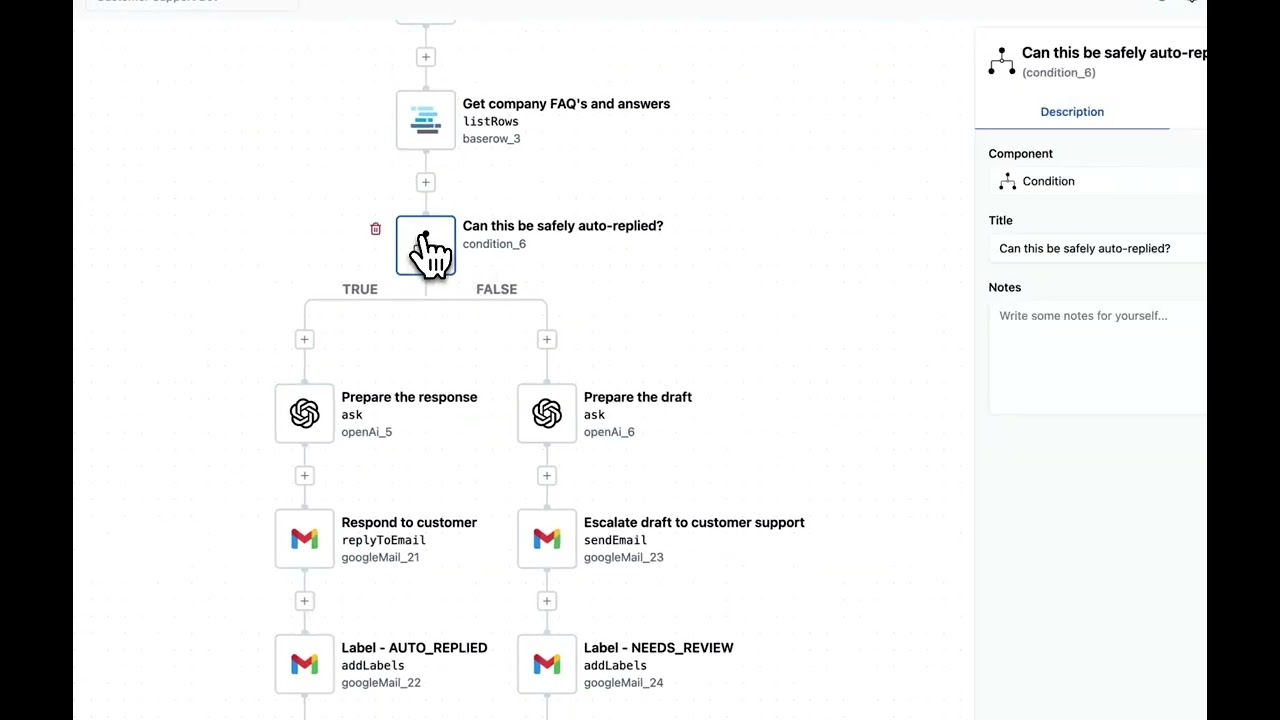

AI agents as first-class workflow steps

A drag-and-drop AI Agent component runs the full agent loop: model, tool selection, execution, observation, next step, with streaming and structured output. The agent is one step in a durable workflow, so a run that fails or pauses for a human resumes from that step instead of starting over. The core is Apache 2.0, and the same agents ship inside your own product through the embedded edition.
Build Workflows with Ease using Copilot

Build AI agents and workflows by talking to ByteChef. The Copilot generates workflows from a sentence, drops in configured agent steps, explains failed runs and suggests fixes.
Quick Start
One command
Requirement: Docker Desktop
No database to set up. ByteChef stores everything in an embedded H2 file under ~/.bytechef, next to the generated encryption keys:
docker run --name bytechef -it -p 8080:8080 \
    --env BYTECHEF_DATABASE=h2 \
    --env BYTECHEF_AI_MEMORY_PROVIDER=in_memory \
    -v ~/.bytechef:/root/.bytechef \
    docker.bytechef.io/bytechef/bytechef:latest
On Windows PowerShell:
docker run --name bytechef -it -p 8080:8080 --env BYTECHEF_DATABASE=h2 -v "$HOME\.bytechef:/root/.bytechef" docker.bytechef.io/bytechef/bytechef:latest
Open http://localhost:8080/login → Create Account → sign in.
First workflow, no credentials needed: import Learn ByteChef by doing from the template library and run it.
H2 is for evaluation only. The AI knowledge base and Copilot need PostgreSQL with pgvector, and there is no migration path from H2 to PostgreSQL, so use Docker Compose for anything you intend to keep.
Docker Compose (PostgreSQL)
Requirement: Docker Desktop
This is the recommended setup. Download the docker-compose.yml file from the repository:
curl -O https://raw.githubusercontent.com/bytechefhq/bytechef/master/docker-compose.yml
docker compose -f docker-compose.yml up
Both PostgreSQL database and ByteChef containers will start automatically.
Open http://localhost:8080/login → Create Account → sign in.
Docker (Manual Setup)
If Docker Compose isn't supported in your environment, follow these steps:
1. Create Docker Network
docker network create -d bridge bytechef_network
2. Start PostgreSQL Container
docker run --name postgres -d -p 5432:5432 \
    --env POSTGRES_USER=postgres \
    --env POSTGRES_PASSWORD=postgres \
    --hostname postgres \
    --network bytechef_network \
    -v /opt/postgre/data:/var/lib/postgresql/data \
    postgres:15-alpine
3. Start ByteChef Container
ByteChef generates the key that encrypts stored connection credentials and the remember-me key on first start. Mounting~/.bytechef keeps them on the host, so they survive recreating the container:
docker run --name bytechef -it -p 8080:8080 \
    --env BYTECHEF_DATASOURCE_URL=jdbc:postgresql://postgres:5432/bytechef \
    --env BYTECHEF_DATASOURCE_USERNAME=postgres \
    --env BYTECHEF_DATASOURCE_PASSWORD=postgres \
    -v ~/.bytechef:/root/.bytechef \
    --network bytechef_network \
    docker.bytechef.io/bytechef/bytechef:latest
Note: Use -d flag instead of -it to run in detached mode.
Open http://localhost:8080/login → Create Account → sign in.
Then build your first agent
An agent needs a model. Connect any of the 12 LLM providers with an API key, or run Ollama locally and connect it with no key at all. Or import the Build your first agent template, which needs only an OpenAI key.
- New Project → New Workflow
- Keep the Manual trigger, or pick another
- Add the AI Agent component
- Pick a model and its connection
- Attach tools from 250+ connectors; optionally add a knowledge base and guardrails
- Write the instructions and configure each tool's parameters in the properties panel
- Click Test and read the agent's tool calls in the execution log
- Deploy
Workflow Automation
- Visual editor with JSON underneath, Git-friendly
- Flow controls:
condition·branch·loop·each·map·parallel·fork-join·subflow·on-error·terminate·waitForApproval - Triggers: static & dynamic webhooks · polling · hybrid · app-event listeners · callable, plus schedule and form components
- Polyglot code: JavaScript · Python · Ruby on GraalVM
- Durable execution and orchestration on the Atlas runtime: every task execution is persisted in Postgres, so a stopped, failed or approval-paused run resumes from the task it reached. Queue mode for horizontal scale (memory · Redis · RabbitMQ · Kafka · JMS · AMQP · SQS)
- Workflows-as-APIs (EE): workflows can be an authenticated HTTP endpoint
- Git-native (EE): push from the UI, environments backed by branches
The Unification
- Agents inside workflows: an agent is a step; downstream branches react to its decisions
- Workflows as agent tools: a "refund order" workflow with retries and approvals becomes one tool
- Sub-agents: coordinator agents call specialist agents
- Human-in-the-loop: pause on approval, route to Slack/email, resume on response
- One audit log: agent decisions, tool calls, workflow runs, human approvals, all in one trail
250+ connectors
CRM · marketing · communication · e-commerce · cloud storage · databases · AI/ML · helpdesk · finance. Every connector is also an agent tool, also an MCP tool. Browse the integrations catalog or the component reference.
Want a connector we don't have? Build it in an afternoon, or pick one from the open connector requests.
Open core: Apache 2.0 + EE
| Capability | CE (Apache 2.0) | EE |
|---|---|---|
| Visual editor, AI agents, workflows, 250+ connectors | ✅ | ✅ |
| Polyglot code (JS/Python/Ruby) | ✅ | ✅ |
| Knowledge bases, vector stores, guardrails, MCP server | ✅ | ✅ |
| Agent skills, agent evaluations | 🚧 in development | 🚧 in development |
| Self-host (Docker / Kubernetes / Helm) | ✅ | ✅ |
| Workflows-as-APIs | ✗ | ✅ |
| Git-native | ✗ | ✅ |
| Microservices deployment | ✗ | 🚧 in development |
| AI Copilot | ✗ | ✅ |
| SSO / SAML / OIDC, SCIM, advanced RBAC | ✗ | 🚧 in development |
| Connection scope sharing (Private / Workspace / Organization) | ✗ | 🚧 in development |
| Multi-environment promotion, audit log with correlation IDs | ✗ | ✅ |
| AI Gateway: model routing, quotas, cost controls | ✗ | 🚧 in development |
| Embedded iPaaS: ship integrations and AI agents inside your SaaS product | ✗ | ✅ |
FAQ
How is this different from n8n, Zapier or Make?
Three things.
- License. The ByteChef core is Apache 2.0. n8n ships under its Sustainable Use License, and Zapier and Make are closed SaaS. You can self-host ByteChef, modify it and use it commercially, with no fair-use clause.
- Mid-run resume. Every task execution is persisted on the Atlas runtime. A run that fails, is stopped, or waits for a human approval resumes from that task with its state intact, instead of re-running from the trigger.
- Embedded. ByteChef also ships as an embedded iPaaS (EE), so your SaaS product can offer integrations and AI agents to its own users, under your UI and your tenancy.
On top of that, an agent in ByteChef is a step that owns a loop: it selects tools, executes them, observes the result and decides what to do next. Any workflow can be published as an MCP tool for agents to call. Deterministic branching, retries and approvals live in the same graph as the model, under one audit trail.
Feature-by-feature comparisons: n8n · Zapier · Make · Activepieces · all comparisons
How is this different from LangChain, LangGraph or CrewAI?
Those are libraries you build an application around: you own deployment, persistence, retries, credential storage and the UI. ByteChef is the running system: durable execution, a visual editor, managed connections, and 250+ connectors that are already agent tools. You can still drop into code where it earns its place; it just isn't the only way in.
Which LLM providers ship out of the box?
Twelve direct providers (OpenAI, Anthropic, Azure OpenAI, Amazon Bedrock, Google Gemini, Mistral, Groq, DeepSeek, Nvidia, Perplexity, Stability and Ollama) plus three aggregator components (OpenRouter, LiteLLM, NanoGPT) if you would rather route through a gateway.
How does an agent get its tools?
Every connector is already a tool, and workflows you expose through the MCP server become tools too. To let the model supply a value at runtime, put the expression =fromAi('order_id', 'STRING', {'description': 'The order to refund'}) in the field instead of a literal: that property then becomes part of the tool schema the model sees. It is the same properties panel you would otherwise type into; there is no separate tool definition to write.
What is available for memory and RAG?
Eight chat-memory backends (built-in, JDBC, Redis, MongoDB, Cassandra, Neo4j, vector-store-backed, in-memory) and fourteen vector stores (pgvector, Pinecone, Qdrant, Weaviate, Milvus, Couchbase, MongoDB Atlas, Neo4j, Redis, Typesense, MariaDB, Oracle, S3, and the built-in knowledge base). Ingestion and chunking are native, and two RAG patterns ship as components: rag-modular and rag-questionanswer.
What guardrails are there?
Twelve, attached to an agent the same way tools and memory are: PII, LLM-based PII, jailbreak, NSFW, topical alignment, keywords, secret keys, URLs, text sanitization, custom regex, custom rules, and a violation aggregator that decides what happens when several fire at once.
Does ByteChef work with MCP?
In both directions. It consumes external MCP servers as a tool source, so remote MCP tools show up alongside connectors in an agent's tool list. It also exposes your own workflows as an MCP server over an API-key-authenticated endpoint, so Claude Desktop, Cursor or Windsurf can call them.
Do I need the Enterprise Edition?
Only for the rows marked EE in the table above. Everything outside server/ee/ and client/src/ee/ is Apache 2.0: free to self-host and use commercially, including modified. Code under those two directories is covered by the ByteChef Enterprise License and is not; see License.
Where do I get help?
- Docs: docs.bytechef.io
- Discord: discord.gg/VKvNxHjpYx, the main community channel
- Issues: GitHub Issues, with templates for bugs, features and connector requests
- Roadmap: project board
- Email: support@bytechef.io
Contributing
If you would like to contribute to the software, read the contributing guide to get started. Want a connector we don't have? Build it in an afternoon: the guide walks through setup, the component definition, actions, triggers, connections and tests. The open connector requests are a good place to start.
License
This project is licensed under Apache 2.0 for the core (everything outside server/ee/ and client/src/ee/) and the ByteChef Enterprise License for code under server/ee/ and client/src/ee/ (microservices, embedded, AI Copilot, SSO/SCIM, advanced RBAC).
Star ByteChef
If ByteChef is useful to you, star the repository. Stars are how other people find the project, and they tell us which direction to keep building in.

Contributors
Credits
ByteChef started as a fork of Piper.
0
Followers
0
Repositories
0
Gists
0
Total Contributions
Chat2DB is a free, cross-platform, local-first database client and SQL workspace for developers, DBAs, analysts, and data teams. Connect to 40+ databases, manage data, edit and run SQL, and use your own AI model to generate, explain, and optimize queries. Available on desktop, web, Docker, and CLI, with MCP support.
LangChain4j is an open-source Java library that simplifies the integration of LLMs into Java applications through a unified API, providing access to popular LLMs and vector databases. It makes implementing RAG, tool calling (including support for MCP), and agents easy. LangChain4j integrates seamlessly with various enterprise Java frameworks.